
Mailing Lists and Labels
The Holray System, whilst having its own email provision, is not an email service. What I mean is that there are specialised email providers that offer all sorts of information to help you with your bulk email marketing and so on. They can identify incorrect or incomplete email addresses, record bounces and numbers of opened emails, aswell as complying with UKGDPR regarding email optouts.
The mailing lists and labels allows you to identify your customers to whom you would like to send an email, or postal campaign. It will allow you to choose your criteria, perhaps all holidays taken this year, or maybe booked since 2019, or perhaps all bookers sourced from a specific booking source like a newspaper who offered deals.
When a booking is made, the booker will have been asked about permissions to receive email or postal marketing. This is very important because if they ask to not receive something, and they then receive something, they can complain to the ICO who inturn, can fine you, the marketer, for ignoring these preferences. However, as always there is a caveat/ loop hole. If you can prove that you have a legitimate interest in contacting a customer (they have left their phone at your office, or more loosly you can offer them a X% discount if they book with you now) you can ignore their preferences.
Rules to remember: if you are sending postal marketing literature, you can include those who have opted out of email marketing. Likewise, if you are sending an email you can ignore postal marketing opt-outs, because bookers who have said no to emails are happy to receive brochures and such like in the post, and those who do not want to receive any postal literature are happy to receive emails. There will be some who opt out of both, and some who opt out of neither.
I have completed the criteria, look carefully at my options. I can export it to excel, to manipulate and then upload the list to an email provider (such as mailchimp) or a printer for addresses.
Make sure that you have not disabled pop ups within your PC. If nothing happens when you export to excel, it may be that pop ups are disabled. There will be on your screen somewhere, a message about pop ups and whether you would like to enable them. Yes you would! Your browser will probably be set to disable them as normal, and so by disabling them, you will see the pop up, but next time you go to do this you will probably have to enable pop ups again.You will not get bombarded with popups if you enable them, and it will not be very long before they are disabled again.
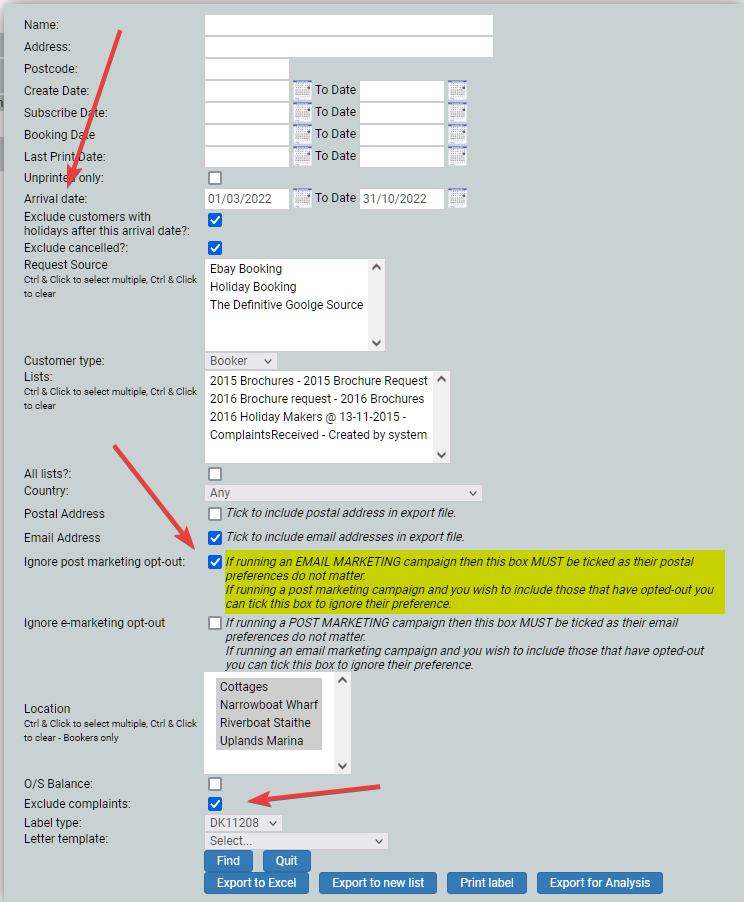
I have chosen holiday dates rather than booking dates, I am sending an email campaign so have chosen to ignore those who have opted out of postal marketing, and I have ticked to exclude complainants.
If I click Find it will show me numbers, as depending on my criteria I may have a huge list, or nothing.
I will then click Export for Analysis so that I can check my data before I do anything with it. It will give me lots of data regarding each booker. Export to Excel will give me less data.