
Maintain Advertising Sources
This is a very useful bit of information grabbing as you can see where your bookers find out about you, in the form of a “where did you hear about us?” way. The request will appear both for a manual booking within the booking page, and also for web bookers. You can set as many different sources as you like, which may be Google, recommended by friends, Tesco vouchers and so on.
You can amend existing ones too, and change the order they appear within the drop down.
Go to the Customer tab and choose Maintain Advertising Sources from the drop down.

To amend an existing one, simply click on it and amend as required, and save.
To create a new one, click on the blue New Source button.
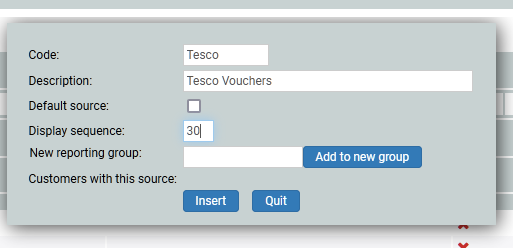
In this example, I am adding Tesco vouchers. The code is Tesco, and the description is Tesco Vouchers. This will appear as Tesco - Tesco Vouchers on the drop down.
Is this the default source? For example, do you want this to be prefilled? If not, leave blank. The display sequence is the instruction to set the order they appear within the drop down. Set your most common souce to be 0 or 10, and then go up in tens (10, 20, 30…) as it is so much easier to add another one in between, rather than bumping everyone down.
If you want to create a group to which others will be part of, for reporting purposes, then here is where you add it. You could have a group called Supermarkets, and add Tesco, Sainsburys, Aldi and so on to the same group. But leave it blank if you have no groups (not many do).
Click on insert.