
This is an old revision of the document!
System Discounts
This is where you set your discounts for your system, rather than individual discounts for a specific booker (i.e. Friends and Family as they are created within Extras)
There are several discounts you can set.
1. Offer a discount to everyone who books, either manually or online. For example a summer discount of 20% for every booker. 2. Offer a discount to online bookers only. 3. Offer a discount for returning customers only. 4. Offer a Late availability discount. 5. Offer a pay in full discount.
I am sure there are many other combinations you can have. As always, you can amend an existing discount or create a new one.
Your discount screen looks like this..
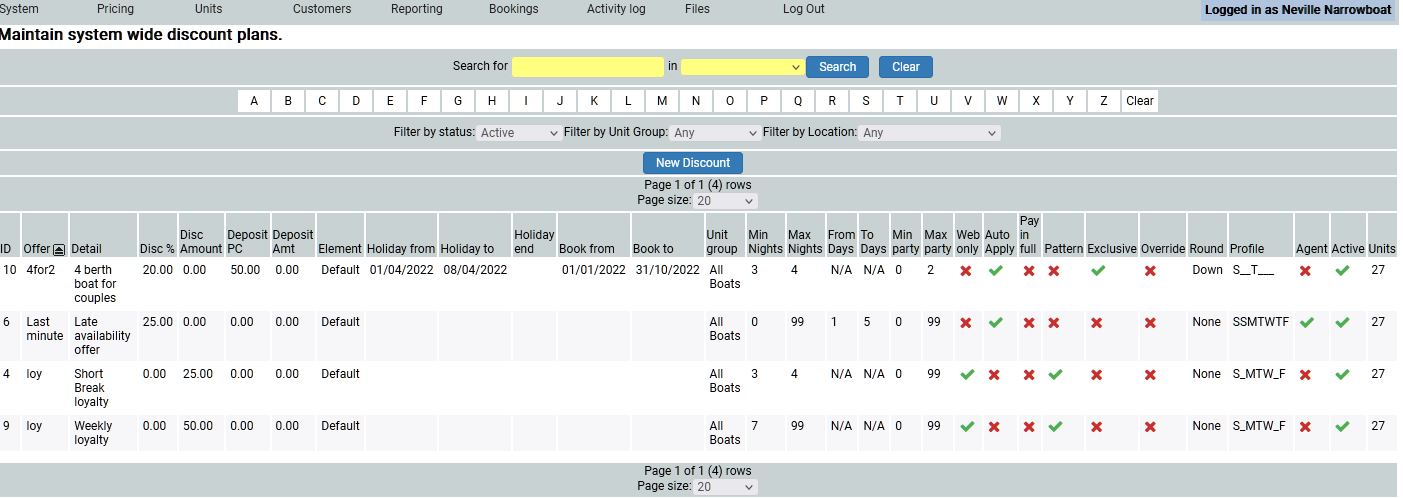
To amend, click on the relevant plan, amend as necessary and save.
To create a new one, click on the blue New Discount button.
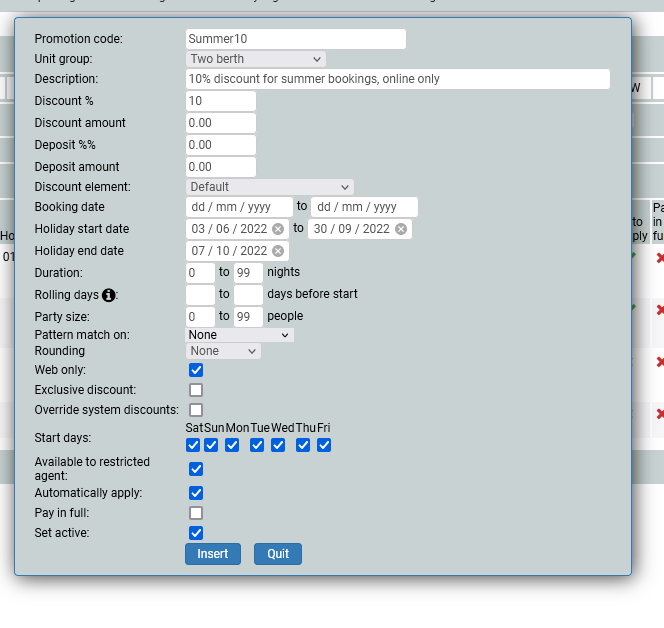
I am calling my discount Summer10 and it is going to be for my two berth boats only (I have already created the group). The description of my plan is 10% discount for summer bookings online. I want the amount to be a %age, rather than an amount. The deposit is unaffected, but I might want to adjust the deposit, or have a limited time only £5 deposit secures your holiday type promotion. The element is default as it does not need to appear as anything else within my reporting or invoicing. I might wish to set my discount for booking made between certain dates but this discount is for holidays taken within specific dates, rather than booked. Because I do not mid how long the holiday is, I have set it to cover everything, hence 0 to 99, likewise with the number in the party. But I might want to resrict the holiday to a minimum of 3 days, or maximum of 4 people.
Rolling days
My discount might be a late availability discount, and so I want to only apply the discount if it is within a certain amount of days before the start date. For example, I might want the discount to apply for holidays that start within 5 days of booking. In which case, I shall set the rolling to be 5 to 1 days before the holiday start date. Now, the discount will only apply to holidays that are within 5 days of starting. Last minute availabilty discounts.
Loyalty
My discount might be for loyalty. For my cutomer to be able to get the discount there must be a way of identifying them. This is where pattern match comes in. If you want the customer to be recognised, they willneed to pattern match on their customer id or their booking id. You would still need to advise them of this discount, via a specific mailing, but they will be able to access their discount online if you have set a pattern match.
In this case, there is no pattern match as anyone can have the discount.
Do I want my discount to be rounded up or down to the nearest pound, or left to two decimal places? I don't mind exact amounts so have set no rounding.
I do want it to be for web bookings only, so I have checked the box for web only.
Existing Discounts
There may be other discounts already inmplace that the booker may be eligable for. If I tick the Exclusive box, it will apply this discount only.If I do not tick the box, it will apply all discounts, in order of savings for the customer (the best discount will be applied first). If you have a standard discount set for a second week of holiday duration for example, and click the exclusive button, this second week standard discount will still be applied, unless the Override system discount box is ticked.
Start days I do not care about, and the system, by default will inclde all possible start days that may be set within your system. Yes I want my agent to see the discount too, yes I want the system to automatically apply the discount (I do not want to have to add it in manually), no the customer does not have to pay in full and yes I want it active. Click insert.
It should show on your web (or in your chart view if it is not a web only discount) immediately.